Converting percentages to decimals is a fundamental skill in statistics, data analysis, and everyday mathematics. Whether you're analyzing data in Excel, performing statistical calculations in R, or doing quick mental math, understanding how to convert percent to decimal format is essential.
This comprehensive guide demonstrates three methods for converting percentages to decimals: manual calculation using the division method, Excel formulas (including handling text-formatted percentages), and R programming with the gsub() function. Each method is explained with step-by-step examples to ensure you can confidently convert any percentage to its decimal equivalent.
How to Convert Percentages to Decimals Manually (Formula Method)
Manually converting percentages to decimals follows a straightforward process using basic division:
-
Take your percentage (say, 45%).
-
Drop the percentage symbol (%).
-
Divide the number by 100 (45 ÷ 100).
-
Result: your decimal (0.45).
Another example: 95% → 95 ÷ 100 = 0.95. The process remains consistent.
For percentages with decimal points, such as 37.5%? apply the same method:
-
Drop the percentage symbol (37.5).
-
Divide the number by 100 (37.5 ÷ 100).
-
Result: your decimal (0.375).
This manual method works for any percentage value.
Convert Percentage to Decimal in Excel (Formula Guide)
Excel provides built-in functionality for converting percentages to decimals using simple formulas:
-
Open Excel and type your percentage into a cell (e.g., A1).
-
Click on an empty cell (e.g., B1) where you want the decimal to appear.
-
Type this formula into the cell:
=A1/100. -
Press Enter to calculate the decimal value (e.g., 0.45).
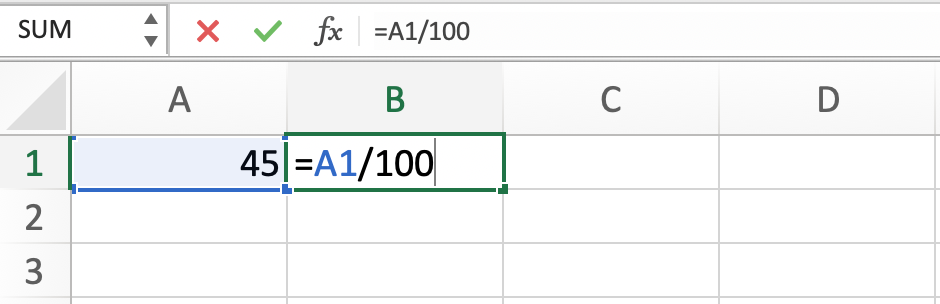
Excel formula =A1/100 converts percentage to decimal format
This formula automatically converts the percentage to decimal format. If you have multiple percentages to convert, copy the formula to the other cells. For example, if you have percentages in cells A2 and A3, copy the formula from B1 to B2 and B3.
For percentages formatted as text with the percentage symbol (e.g., "45%"), use this modified formula:
-
Type this formula into the cell:
=LEFT(A1, LEN(A1)-1)/100. -
Press Enter to calculate the result (e.g., 0.45).
The LEFT and LEN functions remove the percentage symbol before dividing by 100. This approach handles text-formatted percentages effectively.
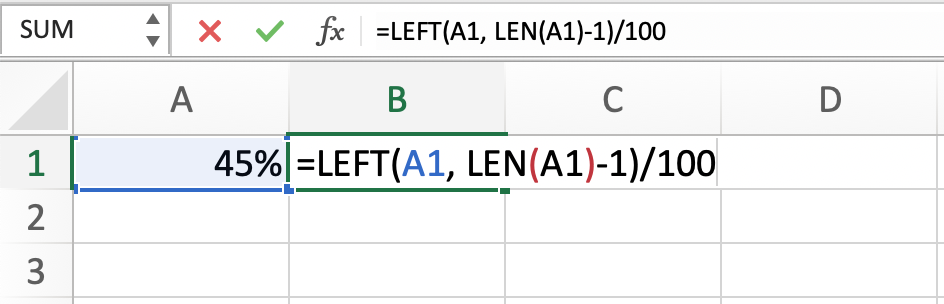
Using LEFT and LEN functions to handle text-formatted percentages in Excel
Convert Percent to Decimal in R (gsub Method)
R provides efficient string manipulation and numeric conversion functions for transforming percentages to decimals:
-
Start by creating a variable with your percentage as a string (e.g.,
percentage <- "45%"). -
Remove the percentage symbol using the
gsubfunction:percentage_no_symbol <- gsub("%", "", percentage). -
Convert the string to a numeric value with the
as.numericfunction:percentage_numeric <- as.numeric(percentage_no_symbol). -
Divide the numeric value by 100 to get your decimal:
decimal <- percentage_numeric / 100. -
Print your decimal:
print(decimal).
The result displays in the console (e.g., 0.45).
Complete conversion script:
percentage <- "45%"
percentage_no_symbol <- gsub("%", "", percentage)
percentage_numeric <- as.numeric(percentage_no_symbol)
decimal <- percentage_numeric / 100
print(decimal)
For converting multiple percentages simultaneously, use vectorized operations:
-
Create a vector with your percentages as strings (e.g.,
percentages <- c("45%", "37.5%", "90%")). -
Remove the percentage symbols using the
gsubfunction:percentages_no_symbol <- gsub("%", "", percentages). -
Convert the strings to numeric values with the
as.numericfunction:percentages_numeric <- as.numeric(percentages_no_symbol). -
Divide the numeric values by 100 to get your decimals:
decimals <- percentages_numeric / 100. -
Print your decimals:
print(decimals).
The console outputs all converted decimal values (e.g., 0.45, 0.375, 0.9).
Here's the complete script for converting a vector of percentages to decimals:
percentages <- c("45%", "37.5%", "90%")
percentages_no_symbol <- gsub("%", "", percentages)
percentages_numeric <- as.numeric(percentages_no_symbol)
decimals <- percentages_numeric / 100
print(decimals)
Frequently Asked Questions
Wrapping Up
Understanding how to convert percentages to decimals is fundamental for statistical analysis and data manipulation. Whether you choose manual calculation, Excel formulas, or R programming depends on your workflow and the volume of data you're processing. Each method produces accurate decimal conversions when applied correctly.
The manual method (dividing by 100) works well for quick calculations, Excel formulas are ideal for spreadsheet-based workflows with large datasets, and R programming provides efficient solutions for statistical analysis and data science projects. Master all three approaches to handle percentage-to-decimal conversions in any context.